

POne | All-in-One Performance Testing Platform-Free to Use

Helps You Rapidly Identify Product Performance Issues

POne Integrated Management, Design, Load Testing, Monitoring, and Analysis

1.Supports Multiple Protocols: HTTP, HTTPS, TCP/IP, MQTT, etc., and Custom Protocols.
2.Flexible Deployment Supporting Local Intranet Load Testing and Cloud-Based Testing.
3.Comprehensive Set of Probes for Multi-Metric Monitoring Across Services.
4.Advanced Features Including SLA Enforcement and Multi- Scenario Load Testing.
5.Supports JMeter Scripts and Team-Centric Management.
6.Up to 100 Concurrent Users – Free of Charge, No Time Limit

  • Management
  • Design
  • Load Testing
  • Monitoring
  • Analysis

Customer Value

  • Management covers the entire process from script writing, scenario design, stress testing and analysis, to defect management.

  • Collaborative Team-Based Performance Test Management,Enables Multi-User Collaboration Within Projects,Improves Operational Efficiency

  • Reuse of Multiple Load Generation Nodes,Increases Utilization of Testing Environments

  • Supports End-to-End Chain Testing,Define System Architecture and Call Chains via Topology Diagrams,Counters for Each Node

  • JVM Monitoring and Analysis Support.Analyze Thread Locks, Memory Usage, Garbage Collection (GC), and Code Execution Time.Optimize Java Application Performance.

Functional Modules

  • Performance Requirements & SLA Module

    Based on the Non-Functional Performance Requirements of the System,Establish SLAs for the Entire Performance Testing Process:Define Specific Scenarios (Functional Points, Concurrent Users, Online Users, Throughput, Duration, etc.)
    All Performance Testing Projects Are Built Upon Target SLA Criteria

  • Performance Script Editor Module

    Offers Both Configuration-Based UI and Code-Based Script Editors,Enables Different User Types to Easily, Quickly Create and Debug Performance Scripts.Supports Performance Scripts for Various Protocols.Supports Importing JMeter Scripts.

  • Test Suite Management and Performance Scenario Management

    Create Performance Scenarios: Configure Scripts, Load Patterns, Virtual User Count, Intervals, Transaction Percentages (or Counts), etc.
    A Test Suite Allows Multiple Performance Scenarios to Be Grouped into a Single Executable Set.POne Enables One-Time Execution of an Entire Test Suite, Saving Time and Reducing Manual Intervention.

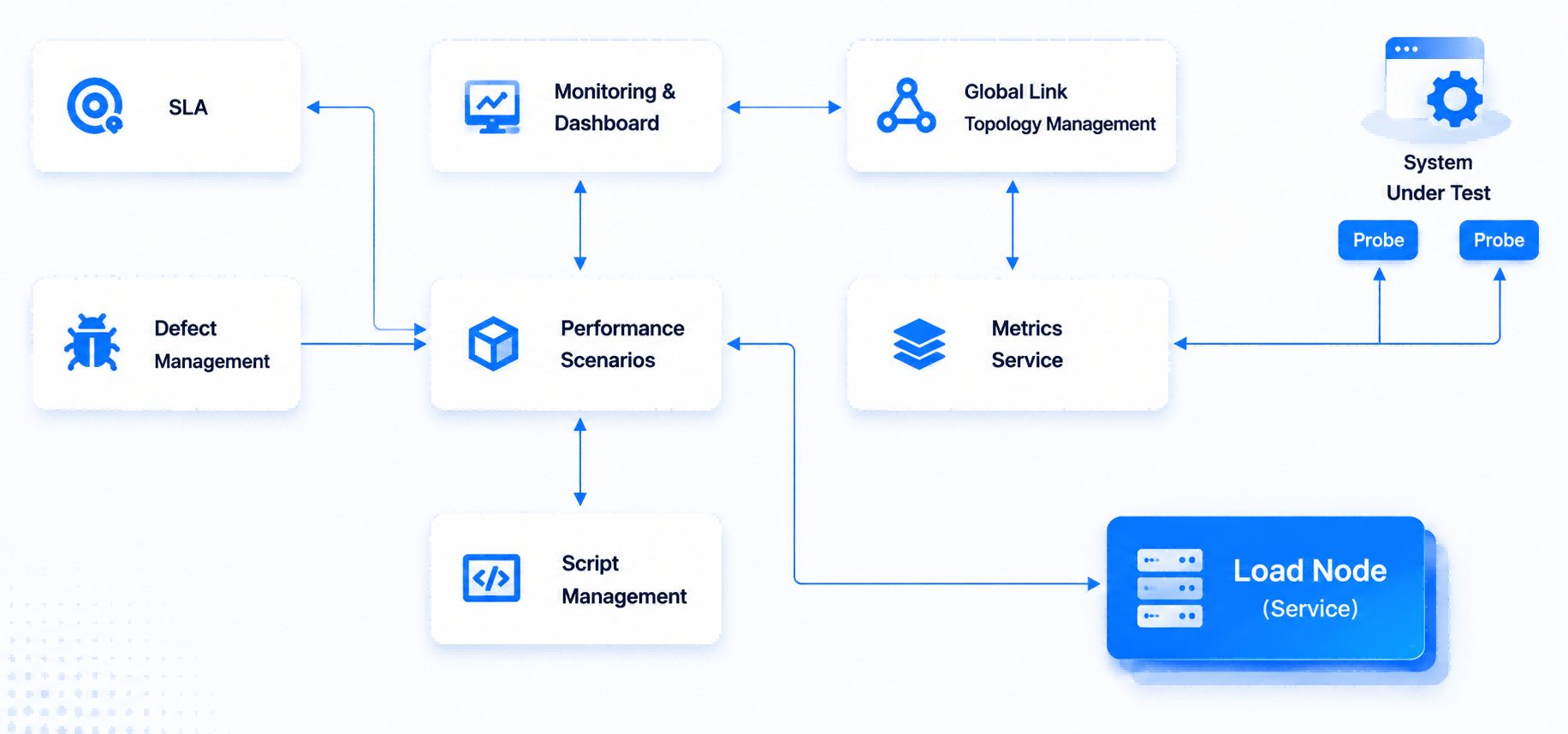
  • Create a full-link monitoring model

    It supports full-link testing, and uses a link architecture diagram to define the architecture and links, as well as the counters for each node.

  • Performance Execution and Monitoring

    Initiate Performance Tests Using Either Test Suites or Individual Scenarios.
    Monitor Execution Status and Progress via Dedicated Dashboards for Each Test Suite or Scenario.

  • Test Analysis and Report

    Generate Post-Execution Performance Analysis Reports in Word or PDF Format Based on Monitoring Data.

  • Defect Tracking

    Allows Performance Issues Identified During Testing to Be Logged as Performance Defects and Submitted to Development Teams.
    Supports Customizable Defect Management Workflows.

  • Test Environment and Executor Management

    Supports Configuration and Management of Executors Across Multiple Load Generation Nodes.

  • Project Management and User Management

    Supports Isolated Management via Project Creation for Different Systems Under Test.All Requirements, Performance Scripts, Test Suites, and Scenarios Are Centrally Managed Within Projects.
    Access to Projects Requires Role-Based Permission Assignment.

Product Architecture Diagram

Product Advantages

  • Performance testing and analysis process
    Integrated Collaborative Platform

    Manage the entire process from performance script management, performance scenario management, test suite management, performance script reuse, performance defect management support, to generating performance test analysis reports, all on a project-by-project basis.
    Support collaborative management and process management within the performance testing team.
    Unified coordination and allocation management of performance testing environments and resources.

  • Low-Code
    Visual Performance Script Editing

    Provides recording and log import capabilities to generate performance scripts.
    Supports low-code editing of performance scripts.
    Performance scripts can be edited and maintained without the need for developers.

  • Multi-Node, High-Concurrency, High-Fidelity Simulation
    Accurately Simulates Massive User Loads

    Employing various stress generation models, it accurately simulates the stress of over 100,000 users.
    It manages multiple stress node clusters, supporting stress simulations initiated from multiple nodes.

  • Multi-Type APM Probes
    Enables Multi-Dimensional Monitoring

    Design a stress distribution graph for the testing task, and analyze the system architecture and transaction flow in detail.
    Based on the stress model graph and each component, define a rich set of counters to analyze stress distribution.
    Based on the distribution graph, display a performance counter dashboard.

  • End-to-End
    Performance Issue Diagnosis

    Based on the link architecture diagram and performance counters, set thresholds according to the SLA protocol.
    Analyze the data of each counter on the link under pressure to determine if it is reasonable, thereby pinpointing the problem.

  • JVM-Level Performance Problem
    Analysis and Root Cause Identification

    Thread lock analysis
    JVM memory management analysis
    Code execution time analysis

Learning Videos

  • POne Quick Start Guide

  • Basic Workflow

  • Create Performance Scripts

  • Define Test Scenarios

  • Execute and Record Results

  • Project Maintenance and Team Collaboration

  • Back-End Administration – User Management

  • Back-End Administration – Project Management

  • Back-End Administration – Environment Management

Version Updates

POne (Client)

2025.06

Streamlined Workflow for Easier Initiation of Performance Tests.

Added Support for Performance Testing of MQ, Streaming Media, SMTP, Dubbo, and Other Interfaces/Tools.

New Interface Recording Method with pcap Capture Tool – Records HTTP/HTTPS Traffic and Automatically Generates Test Scripts.

Load Models Include Constant, Incremental, Concurrent, Surge, and Custom Profiles – Selectable Based on Test Needs.

Enhanced Reporting with SLA Compliance and Flame Graphs; Supports Side-by-Side Report Comparison.

Monitoring – Added RabbitMQ Monitoring Capability.

Localization Support – Compatible with Domestic Operating Systems and Dameng Database

POne v5.5

2024.07

Improved Main Menu UI Design.

Merged Test Sets and Test Scenarios into Unified “Scenario Sets”.

Introduced Task Center Module: Divided into Performance Tasks, Monitoring Tasks, Backup Tasks, and Alert Notifications.

Enhanced Alerting Functionality – Users Can Customize Trigger Cycles and Silence Periods.

Execution Records Split into “In Progress” and “Execution Reports”.

POne v3.0

2023.07

Added JMeter-Based Load Generators to Stress Clusters.

Introduced JMeter Component Type – Allows Importing . JMX Files to Generate Scripts.

New Feature: Convert JMX Files to PR (Proprietary) Scripts.

Integrated with SkyWalking for Distributed Tracing – Monitors Detailed Request Call Chains.

Integrated Proprietary Tracing Solution – View Full Call Chain Information per Request.

Expanded Visual Operations, e.g., Configuring Validation Checkpoints.

POne v2.0

2022.12

Integrated In-House APM Tool – Monitors Service Resources (CPU, Memory), JMX, JVM, Docker, Kubernetes, MySQL, Redis, Nginx, Oracle, etc.

Added Trace Linking Capability – Chaining Multiple Standalone Monitors into End-to-End Monitoring Flows.

POne v1.0

2022.06

Former WebPR Upgraded to POne

包含功能:
User Management.
Project Management.
Load Cluster Management: Manage Load Generators Used in Performance Testing.
Component Management: Includes Component Design and Standalone Debugging – Each Component Represents a Script.
Test Scenario Management: Design Scenarios by Binding One or More Components with Custom Load Strategies.
Test Suite Management: Bind Scenarios for Scheduled, On- Demand, or Immediate Execution.
Execution Records: View Results and Export Reports in Word and HTML Formats.
Real-Time Monitoring: View Server Resource Consumption During Test Execution.

Solution Consultation

Submit Information
Teams:sales@spasvo.com
×
ICP License: Hu ICP Bei 07036474-4 |

Public Security Registration: 31010702003220

© 2015–2025 Shanghai ZeZhong Software Co., Ltd. All Rights Reserved.