.png)


UI Testing
This automated testing platform is compatible with B/S and C/S architectures, and supports automated testing for various browsers and desktop applications.




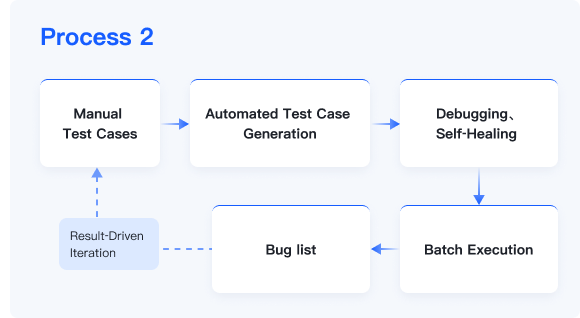
Turn manual test cases & recorded scripts into runnable automation. Built‑in AI agent helps generate, convert, debug and self‑heal test scripts. Run large‑scale batch testing, output defect lists, and continuously iterate test assets. Cut repetitive manual work and lower automation adoption cost.
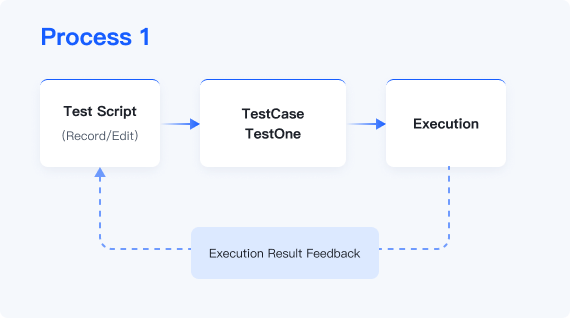
It provides full-process management from requirement analysis to test execution, supports UI, interface and mobile automated testing, as well as customized reports and defect management, aiming to improve testing efficiency and quality.
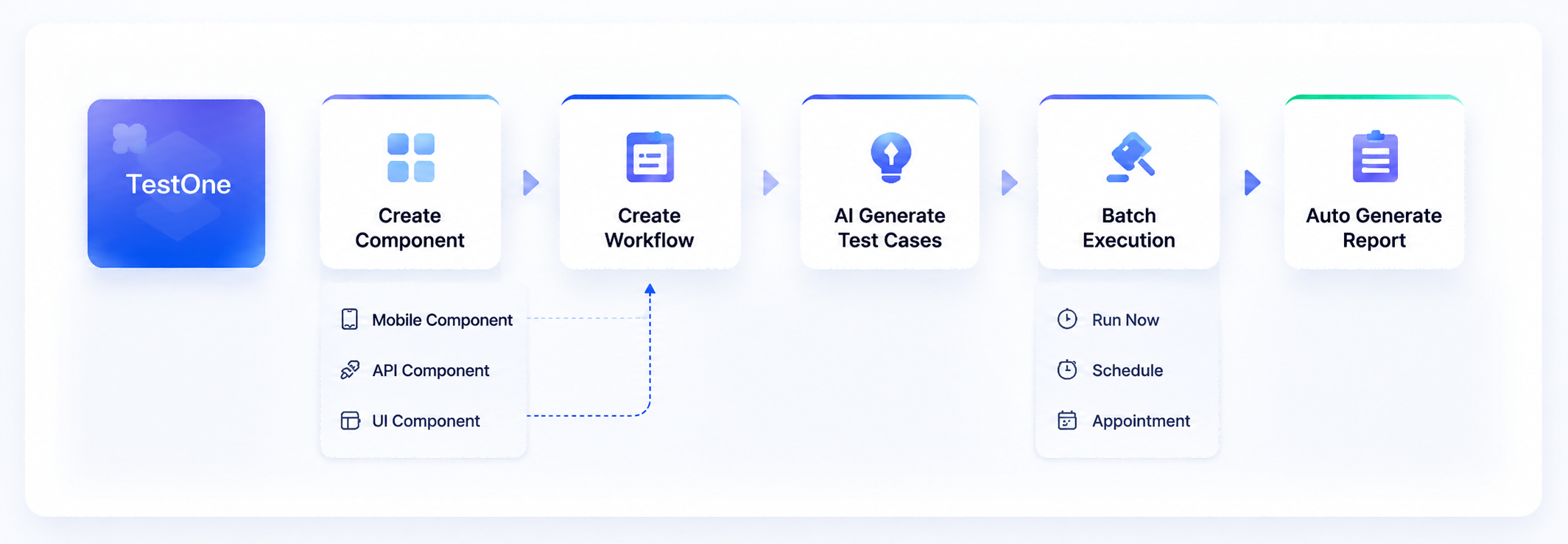
Covers multiple test types and complex business scenarios to help enterprises improve test efficiency and delivery quality.
This automated testing platform is compatible with B/S and C/S architectures, and supports automated testing for various browsers and desktop applications.

Covers Android, iOS and HarmonyOS systems, enabling automated testing for APPs, mini-programs and H5 pages.

Supports protocols including HTTP/HTTPS, TCP/IP, Webservice, Websocket and UDP.

Supports mixed execution of multiple types of test cases; failed cases can be rerun to efficiently complete testing tasks.

Based on business activity diagrams, it intelligently analyzes branch scenarios and automatically generates corresponding test cases.

Build test cases by dragging and combining components; supports data transmission, verification and dynamic parameter configuration.

Supports multi-channel test data configuration to implement flexible and efficient data-driven testing.

Accurately identify root causes of failed test cases, retain complete logs, and support batch rerun of failed cases.

Adopts orthogonal algorithms to automatically generate multi-dimensional test cases, improving test coverage and efficiency.
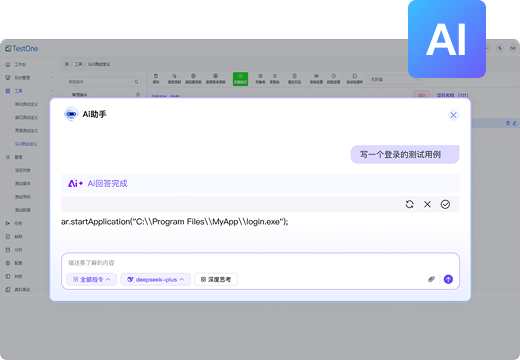
Generate scripts and functions via natural language to streamline testing operations.

Describe business steps and functional requirements in natural language, and the AI will automatically interpret them and generate test scripts.

Automatically generate scripts and functions in accordance with business and functional requirements to cut down manual coding work and lower error rates.

Unify standardized generation logic, improve the stability and maintainability of scripts, and ensure credible test results.
Centered on intelligence, automation and servitization, build a stable and scalable automated testing platform.
Intelligent case design, low-code operation and automatic error log analysis; supports interface & UI end-to-end automation for various scripts.

Service-oriented testing tools with scalable microservice architecture and independent data management service.

Seamlessly connect to test platform microservices, extend custom protocols via interface adapters.
We've helped companies just like yours accelerate with confidence