MR快速入门-Alltesting泽众云测试
Automated testing
TestOne(Free to use online)
Low code, intelligent, and efficient, making testing simple.
GUI Automated Testing
Web UI Automation
Mobile Automation Testing
Mobile App UI Automation
API Automation Testing
Provides a fully configurable and scalable interface testing solution
Precision testing
Precisely quantify the code coverage of test cases
Enterprise Automated Test Service (BPO) Solutions
Empowering enterprises to reduce costs and increase efficiency
Performance testing
Testservice
Automated Testing Service
Save on testing costs and improve application quality in all aspects.
Performance Testing Service
Massive concurrent load testing, end-to-end stress analysis, and professional performance test reports.
Solutions
Security Testing Solution
APM end-to-end load testing solution
Test Management Solution
Functional Testing Solution
Performance testing solutions
Mobile Automation Testing Solution
R&D Project Management Solution
About us
News
Automated testing
TestOne(Free to use online)
GUI Automated Testing
Mobile Automation Testing
API Automation Testing
Precision testing
Enterprise Automated Test Service (BPO) Solutions
Performance testing
Testservice
Automated Testing Service
Performance Testing Service
Solutions
Security Testing Solution
APM end-to-end load testing solution
Test Management Solution
Functional Testing Solution
Performance testing solutions
Mobile Automation Testing Solution
R&D Project Management Solution
About us
News
400-035-7887
Log in
Register
Teams
Mail
sales@spasvo.com
Mail
你还未绑定微信号,请绑定微信
绑定微信
MR入门教程
环境配置
安装说明
使用操作
3.1 新建项目
3.2 导入项目
3.3 新建脚本
3.4 导入脚本
3.5 录制脚本
3.6 回放脚本
3.7 编辑脚本
新建脚本
路径:
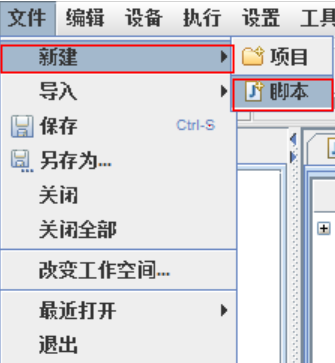
【文件】-【新建】-【脚本】
描述:
点击菜单栏【文件】,选择新建脚本
截图:
步骤:
步骤:
1.点击【文件】
2.选择【新建】-【脚本】
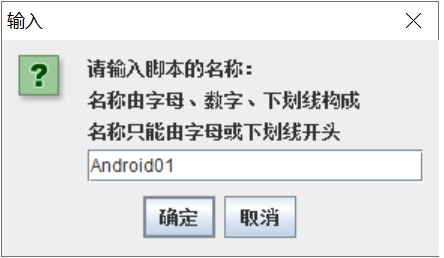
3.点击确定,脚本创建成功
4.点击取消,取消创建脚本
栏位名称
描述
特殊要求
脚本名称
输入脚本名称
名称由字母、数字、下划线构成
名称只能由字母或下划线开头